
THIRD-PARTY SOFTWARE RISK
AION2 ING Meter: Third-Party Download, Installation, Use & Safety
Answer first: ING Meter is third-party AION2 combat-record software from AIONING, not an official NC tool. For a download or installation, use the developer release page linked here to recheck the current build; KINA does not mirror an executable, guarantee its safety, or decide compliance for every NC service region.
- KINA published
- Last verified
- Author
 PFGWebsite Author
- Reading time
- 9 min read
ANSWER FIRST
ING Meter is an AIONING third-party tool; verify downloads on the developer release page
It measures and uploads AION2 combat records, then connects them to rankings, recent records, and character details. KINA does not host, relay, or mirror an installer, certify an executable as safe, or present it as an official NC tool.
- Version checked
- v1.7.1 · rechecked July 23, 2026
- Release formats
- The developer page lists Setup, portable, and release notes
- Important
- Third party · not an NC tool · no installer hosted by KINA
What is ING Meter?
AIONING describes ING Meter as an AION2 combat-record tool that measures and uploads combat data, then connects it to rankings, recent records, and character details. It is third-party software, not an NC feature. Players must decide whether to install it and whether its use fits the current rules for their service region.
Current version and download source
When rechecked on July 23, 2026, the AIONING developer page still listed Setup and portable v1.7.1 and dated the v1.7.1 release July 15. Its download choices lead onward to the GitHub Release used by the developer. KINA links only to the AIONING information page and does not store, relay, or mirror a file. The earlier v1.6.6 deployment warning is historical, not the current release status, and no release note establishes NC approval.
Installation prerequisites and risk checks
A packet-recording and upload tool may involve system privileges, packet-capture components, firewall access, public character data, and region-specific rules. A visible download does not establish that an executable is safe or allowed in every region.
- Check the version, release date, full notes, and any available signature or hash on the AIONING developer page.
- Confirm whether the current Setup or portable build uses Npcap or WinDivert and whether its privileges and firewall changes are acceptable.
- Read the combat-record upload, character-publication, retention, and withdrawal controls; do not install when they are unclear.
- Check the latest terms and notices for your service region, and never bypass system or game security controls to make the tool run.
How to start installation from the developer page
This sequence helps verify the source and installation choices. It does not replace the developer instructions or provide a direct file. The expandable AIONING user guide is labeled for versions before 1.2, so controls may differ in v1.7.1.
- 01
Open the AIONING developer release page
Use the action above to open aion.ing, then read the current version, release date, and complete notes. Avoid reuploads and unfamiliar shortened links.
- 02
Choose Setup or portable
The developer page currently lists both. The v1.7.1 notes specifically describe a PC-room portable build that uses Npcap without requesting administrator rights; other versions and environments must follow their current notes.
- 03
Review packet capture and permissions
The developer page links Npcap, while the release history also discusses WinDivert. Verify their source, privileges, and firewall prompts before continuing; do not disable security controls just to force execution.
- 04
Read upload and publication consent
At first run or in settings, review combat-record uploads, character publication, storage, and withdrawal. Do not submit or continue with related features if you do not agree.
- 05
Check status before a real encounter
Confirm the indicator beside the application logo, character recognition, and capture mode before combat. If status is abnormal, return to the current developer notes for troubleshooting.
Basic ING Meter use
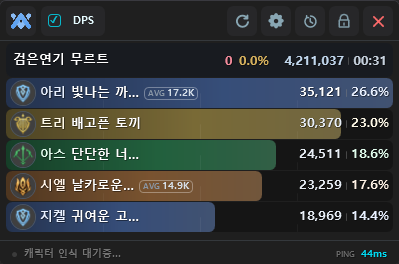
The current AIONING page visibly documents a status indicator, main dashboard, DPS cards, skill analysis, and settings. Its expandable user guide is marked for versions before 1.2, so the location of controls may have changed.
- 01
Confirm status and character recognition
After starting AION2 and ING Meter, check the indicator beside the logo and confirm that the tool reports a measurement-ready state.
- 02
Enter combat and read the DPS cards
After a supported encounter begins, the dashboard presents recorded results as DPS cards. Treat them as third-party measurements, not official NC combat data.
- 03
Open skill-level analysis
Use the combat record to inspect skill-level measurements and remember that a game or parser update can change the result.
- 04
Use quick controls and settings
AIONING says current controls include reset and always-on-top options from a dashboard right-click menu plus display settings. Check before resetting any local record you still need.
Common problems and error checks
Most problems involve the current build, packet-capture component, privileges, character recognition, or network restrictions. Use current developer fixes instead of disabling security software or bypassing game protections.
- No measurement: check the current version, status indicator, and character recognition, then verify Npcap or WinDivert against the developer instructions.
- Privilege or firewall prompt: do not dismiss it automatically; confirm the file source, requested access, and service-region rules.
- Portable build does not update: the v1.7.1 notes say the PC-room portable build has automatic updates disabled and requires a fresh ZIP from the developer page.
- Missing upload or abnormal record: check current AIONING release notes and service status, and avoid repeatedly submitting sensitive data.
ING Meter frequently asked questions
These answers reflect the AIONING developer page visible on July 23, 2026. Versions, controls, and service policies can change.
- 01
Is ING Meter an official NC tool?
No. It is a third-party AIONING tool. Neither a KINA link nor an AIONING release note is an NC endorsement.
- 02
Can I download it directly from KINA?
No. KINA does not store, relay, or mirror an installer; it links to the AIONING developer release page.
- 03
Should I choose Setup or portable?
Their privileges, packet-capture component, and update behavior may differ. Read the notes for the current release and choose for your own environment.
- 04
Why does it mention Npcap, WinDivert, or administrator rights?
The developer release history identifies them as parts of its packet-capture and runtime choices. The user must decide whether to accept the driver, privileges, and firewall changes.
- 05
What data does it upload?
The developer page says it uploads combat records and connects them to rankings, recent records, and character details. Review publication consent, retention, and withdrawal before use.
DATA SOURCES
Scope and update date
Check the applicable game service, last verification date, and original sources. Confirm live values and availability in game.
- Last verified
The AIONING developer page and release history were rechecked on July 23, 2026. The NC anti-automation release remains separately labeled; KINA provides no installer mirror or direct file download.